
Web API Guide
Before starting, it should be noted that all WebAPI's require "API keys" that can be obtained on your Group-Flow Dashboard API panel(Panel is accessible only to Founder & Developer)
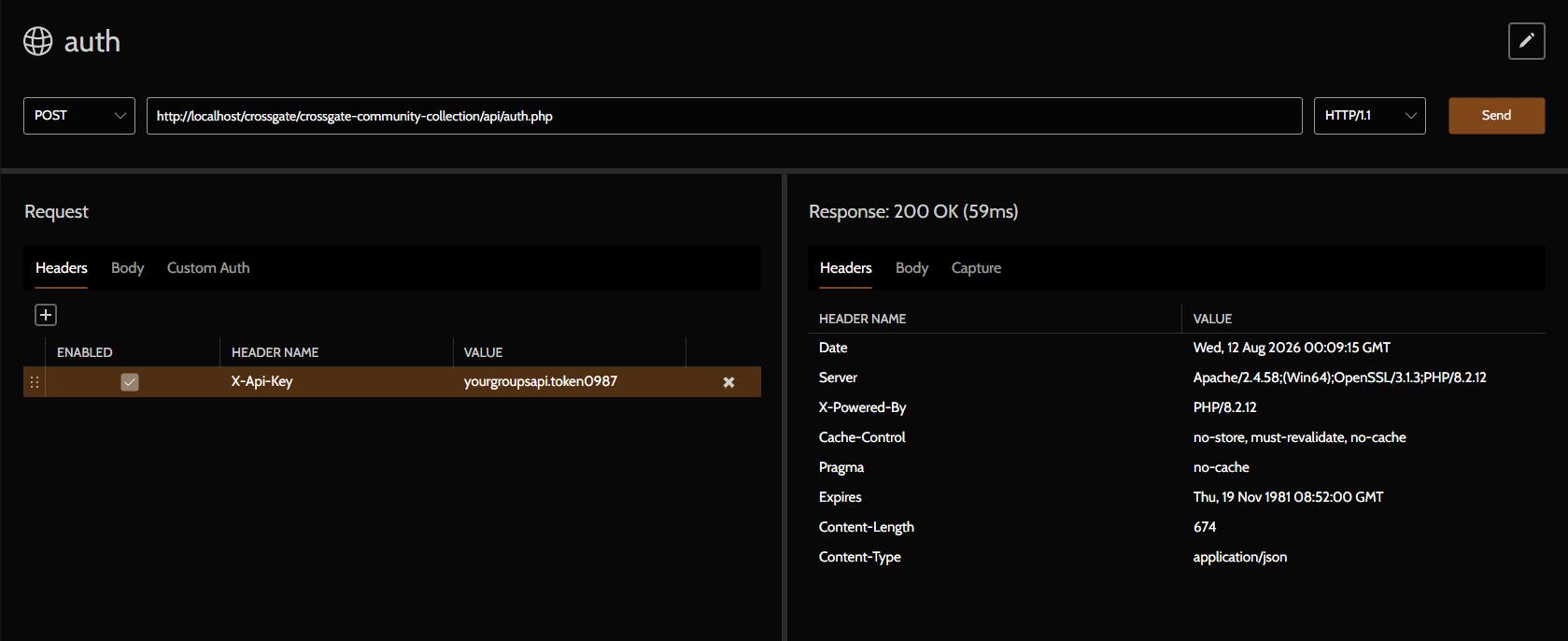
On every WebAPI request must include the "X-Api-Key" header with value of your groups API keys, see table & example using pororoca below
Enabled
True
Header Name
X-Api-Key
Value
yourgroupsapi.token0987
Authentication
Base URL: https://thedomain.com/api
Login and Session check
Method:POST, route:/auth.php
Content Type: application/json
{
"username": "username",
"password": "password",
"os": "osName",
"address": "ipaddress-or-osids",
"sessionless": true
}
Response(200 OK)
{
"message": "success",
"profileTags": "usernames#0987",
"profileAttachs": "img_0987.png",
"profileNames": "usernames",
"profileJDates": "1/1/1111",
"profileBadge": {
"campaign_badge_group_id": ["badge_stage_1", "badge_stage_2"], "multiplayer_badge_group_id": ["badge_first_win"]
}
"profileMarkOut": {}
}
Method:PUT, route:/reauth.php
Content Type: application/json
{
"tokens": "sessiontokens",
"os": "osName",
"address": "ipaddress-or-osids"
}
Response(200 OK)
{
"message": "Session Valid",
"profileTags": "usernames#0987",
"profileAttachs": "img_0987.png",
"profileNames": "usernames",
"profileJDates": "1/1/1111",
"profileBadge": {
"campaign_badge_group_id": ["badge_stage_1", "badge_stage_2"], "multiplayer_badge_group_id": ["badge_first_win"]
}
"profileMarkOut": {}
}
Client technical detail
The client is not an absolute rules on how and what to build when interfacing with the API, but rather a reference point of what the "minimum" usability that user will expect when using your launcher.
Rather than compiling language-specific C/C++ SDK wrappers, It is decided that software running from the CGCC Client Launcher should communicates directly with an embedded local HTTP server running inside the launcher process.
Launcher API Reference
Base URL: [http://127.0.0.1](http://127.0.0.1):{CGCC_PORT}
Method:GET, route:/get_user_info
Retrieves public profile details and a list of all unlocked badge IDs grouped under their respective badge group references.
Headers
application/json
Response(200 OK)
{
"status": "success",
"profileTags": "usernames#0987",
"username": "usernames",
"obtainedBadges": {
"campaign_badge_group_id": ["badge_stage_1", "badge_stage_2"], "multiplayer_badge_group_id": ["badge_first_win"]
}
}
Method:POST, route:/unlock_badge
Triggers an badge unlock request. CGCC validates the request, updates the backend server (/api/updateBadges.php), refreshes the UI, and pops up a desktop the popup toast.
Headers
application/json
Body Payload
{
"badge_id": "badge_stage_1",
"group_ref": "group_campaign"
}
Response(200 OK)
{
"status": "queued",
"badge_id": "badge_stage_1"
}
Implementation Examples
Via cURL / Testing CLI
Fetch User Info
curl -X GET "http://127.0.0.1:$CGCC_PORT/get_user_info"
Unlock Badge
curl -X POST "http://127.0.0.1:$CGCC_PORT/unlock_badge" \
-H "Content-Type: application/json" \
-d '{"badge_id": "badge_stage_1", "group_ref": "group_campaign"}'
C#(.NE/Unity)
using System;
using System.Net.Http;
using System.Text;
using System.Threading.Tasks;

public class CGCCIntegration
{
    private readonly string _baseUrl;
    private readonly HttpClient _httpClient = new HttpClient();

    public CGCCIntegration()
    {
        string port = Environment.GetEnvironmentVariable("CGCC_PORT") ?? "5000";
        _baseUrl = $"http://127.0.0.1:{port}";
    }

    ///
    /// Fetches public profile details and unlocked badges.
    ///
    public async Task GetUserInfoAsync()
    {
        try
        {
            HttpResponseMessage response = await _httpClient.GetAsync($"{_baseUrl}/get_user_info");
            return await response.Content.ReadAsStringAsync();
        }
        catch (Exception ex)
        {
            Console.WriteLine($"CGCC API Error: {ex.Message}");
            return null;
        }
    }

    ///
    /// Unlocks a badge/achievement.
    ///
    public async Task UnlockBadgeAsync(string badgeId, string groupRef)
    {
        try
        {
            string jsonBody = $"{{\"badge_id\":\"{badgeId}\",\"group_ref\":\"{groupRef}\"}}";
            var content = new StringContent(jsonBody, Encoding.UTF8, "application/json");

            HttpResponseMessage response = await _httpClient.PostAsync($"{_baseUrl}/unlock_badge", content);
            return response.IsSuccessStatusCode;
        }
        catch (Exception ex)
        {
            Console.WriteLine($"CGCC Unlock Failed: {ex.Message}");
            return false;
        }
    }
}
Godot(GDScript)
extends Node

var cgcc_port: String = ""
var base_url: String = ""

func _ready():
cgcc_port = OS.get_environment("CGCC_PORT")
if cgcc_port == "":
    cgcc_port = "5000" # Fallback port for local testing
base_url = "http://127.0.0.1:" + cgcc_port

## Fetch public user info and obtained badges
func get_user_info(callback: Callable):
var http_request = HTTPRequest.new()
add_child(http_request)

http_request.request_completed.connect(
    func(result, response_code, headers, body):
        if response_code == 200:
            var json = JSON.new()
            if json.parse(body.get_string_from_utf8()) == OK:
                callback.call(json.get_data())
        else:
            push_error("CGCC: Failed to fetch user info. Code: %d" % response_code)
        http_request.queue_free()
)

http_request.request(base_url + "/get_user_info")

## Unlock a badge achievement
func unlock_badge(badge_id: String, group_ref: String):
var http_request = HTTPRequest.new()
add_child(http_request)

var payload = {
    "badge_id": badge_id,
    "group_ref": group_ref
}
var json_data = JSON.stringify(payload)
var headers = ["Content-Type: application/json"]

http_request.request_completed.connect(
    func(result, response_code, headers, body):
        if response_code == 200:
            print("CGCC: Badge unlock sent successfully!")
        else:
            push_error("CGCC: Failed to unlock badge. Code: %d" % response_code)
        http_request.queue_free()
)

http_request.request(base_url + "/unlock_badge", headers, HTTPClient.METHOD_POST, json_data)